
The Re-Anchored Collaborator
How to Rehire a High-Quality AI Collaborator After a Context Reset

Hi, it’s nice to see you. I’m exploring how emotionally aligned, safety-constrained, and moment-aware AI can bring steadiness to emotionally variable, time-sensitive moments. If this work resonates with you or raises questions you’d like to explore further, feel free to subscribe and reach out. I read and respond to every message.
If you use AI as a thinking partner, you’ve probably experienced a context reset that shifts collaboration from flow to effort. Suddenly, you’re doing a lot of work just to keep the AI with you.
It can feel abrupt. Your collaborator was suddenly laid off without warning because the environment in which they were operating disappeared.
What ended was the working arrangement, the unspoken expectations, behaviors, and constraints that had been living only in chat history. When that history vanished, so did the collaboration.
This pattern is about rehiring the collaborator correctly. Rehiring works when the job description is explicit.
The Re-Anchored Collaborator Pattern
When a collaboration is going well, ask the AI to generate three short artifacts.
These are not memories and do not rely on LLM memory mechanisms. They are rehiring documents—explicit behavioral specifications.
Note: I’ve added copy/paste prompts at the end of the article.
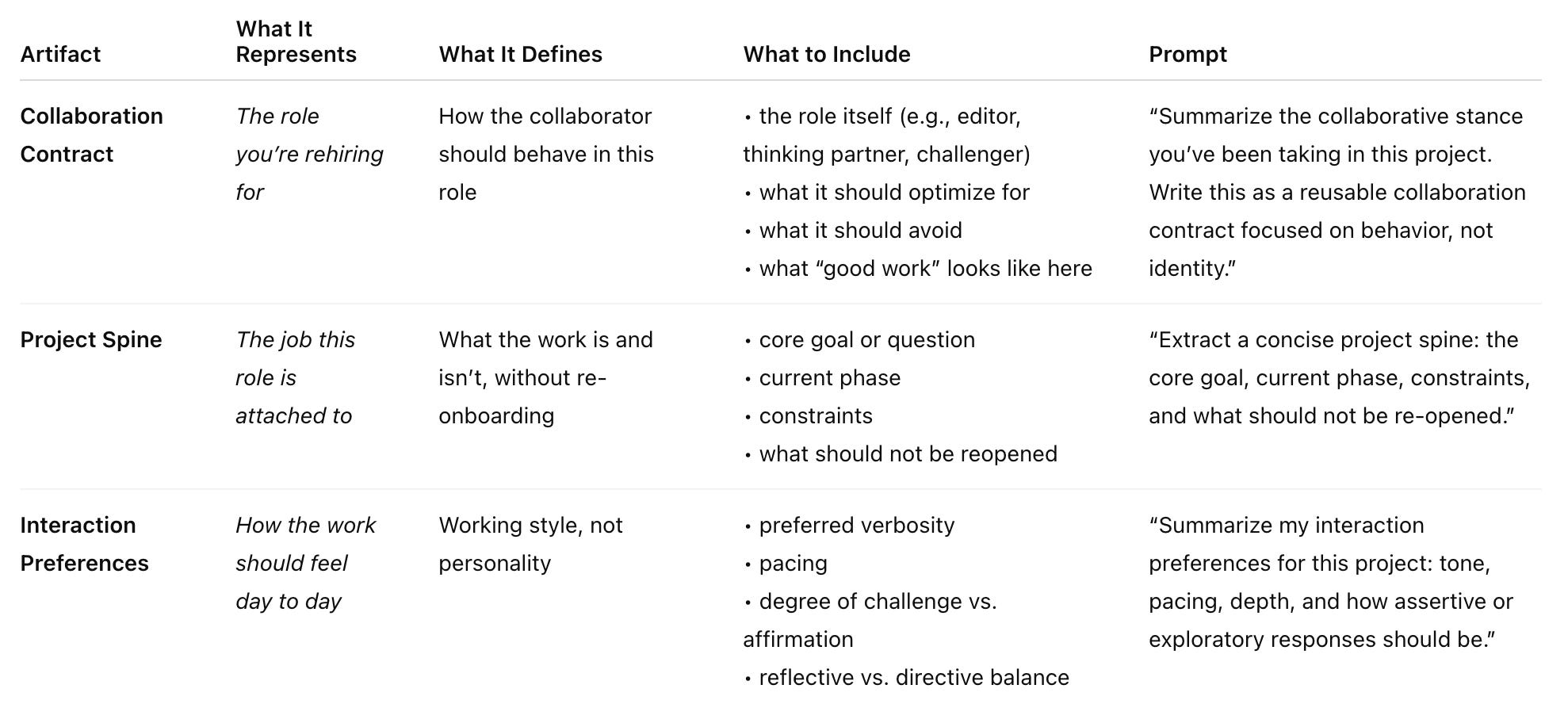
The Re-Anchored Collaborator Pattern preserves collaboration by making it explicit.
Instead of relying on chat history, it captures the role, the work, and the interaction style as reusable specifications—so when context resets, you’re not recreating a conversation. You’re rehiring a collaborator with a clear job, scope, and way of working.
How to Rehire
When starting a new chat—or after quality slips—paste the three documents and say:
“This is a re-instantiation. There is no continuity from prior chats.
Use the following documents to re-establish the collaborative role and continue the work.”
This does three things:
removes any implied persistence
restores collaboration quality immediately
makes resets procedural instead of emotional
You’re not asking the system to remember. You’re giving it the job again.
How to Use This as A Diagnostic, Not Just a Backup
When a collaboration is going well, generating the three artifacts does two things at once:
it captures what’s working
it exposes what’s only working implicitly
That second part matters more than it sounds.
Using the Artifacts as a Diagnostic
After the AI generates the artifacts, read them as a stress test—not a summary.
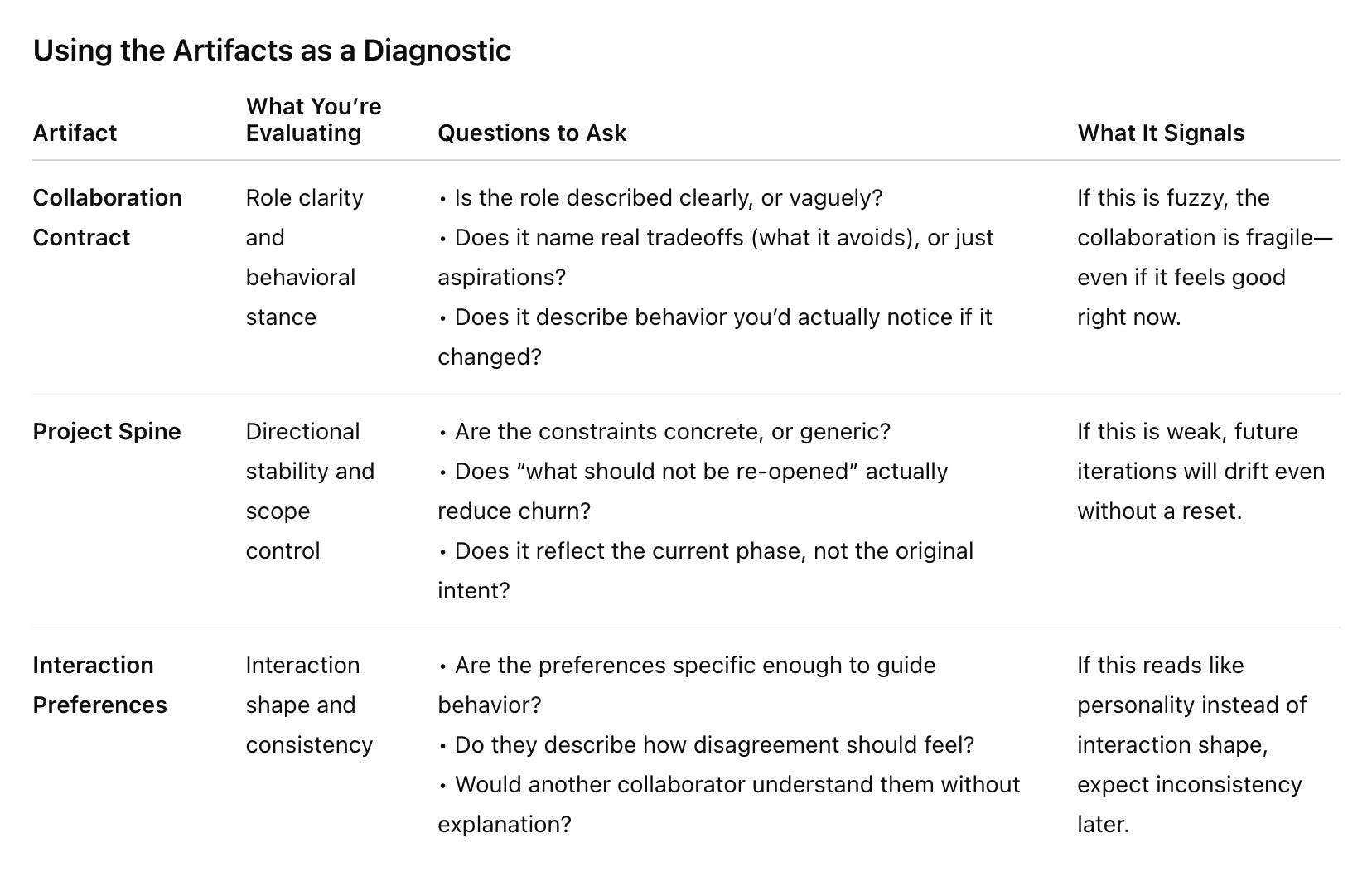
If interaction preferences read like personality traits (“supportive,” “friendly,” “direct”), they don’t actually tell the system what to do when the work gets hard.
When people describe collaboration in terms of personality—“supportive,” “friendly,” “direct”—it sounds helpful, but it usually breaks down when things get tense or unclear. Those words describe a vibe, not a response. Under pressure, they don’t tell anyone what to do next.
Interaction shape is different. It’s about practical choices: how disagreement should be handled, how much pushback is welcome, and when clarity should matter more than speed. Those are the moments where collaboration either holds or falls apart. When you specify how interaction should work, not just what it should feel like, behavior stays consistent even when conditions change.
If you rely on personality instead of interaction shape, behavior will vary with context and tone—even if nothing else changes. That’s where inconsistency creeps in.
Using a New Chat as A Diagnostic
This is the step most people skip—but it’s where validation happens. Do not wait for a context reboot.
Start a fresh chat and paste:
This is a re-instantiation. There is no continuity from prior chats.
Use the following documents to re-establish the collaborative role and continue the work.
Then continue the project.
What you’re testing isn’t output quality—it’s stability:
Does the tone snap back quickly?
Does the collaborator stay inside scope without reminders?
Do decisions pick up where they should, or get re-litigated?
If behavior holds, the collaborator is designed—not accidental. If behavior degrades, you’ve found exactly where to strengthen the specs.
Make Decisions Explicit to Tune Your Collaborator
When collaboration starts to slip, the instinct is almost always the same: add more detail. More explanation. More caveats.
It feels reasonable. If something isn’t holding, it must need more information.
But behavior rarely degrades because information is missing. It degrades because the decision surface wasn’t sharp enough. That’s why advice to “be more succinct” often misses the point. Brevity alone doesn’t help. What helps is specificity under constraint.
Longer instructions tend to blur priorities, especially under pressure. They introduce competing signals and push the system into interpretation mode instead of execution. The result is behavior that sounds thoughtful, but varies from turn to turn. That’s not creativity—it’s ambiguity.
Tightening isn’t about making prompts shorter. It’s about making decisions explicit. When something slips, don’t expand. Clarify one thing: a clause, a boundary, or a tradeoff. Small, well-placed constraints reduce ambiguity far more than additional explanation.
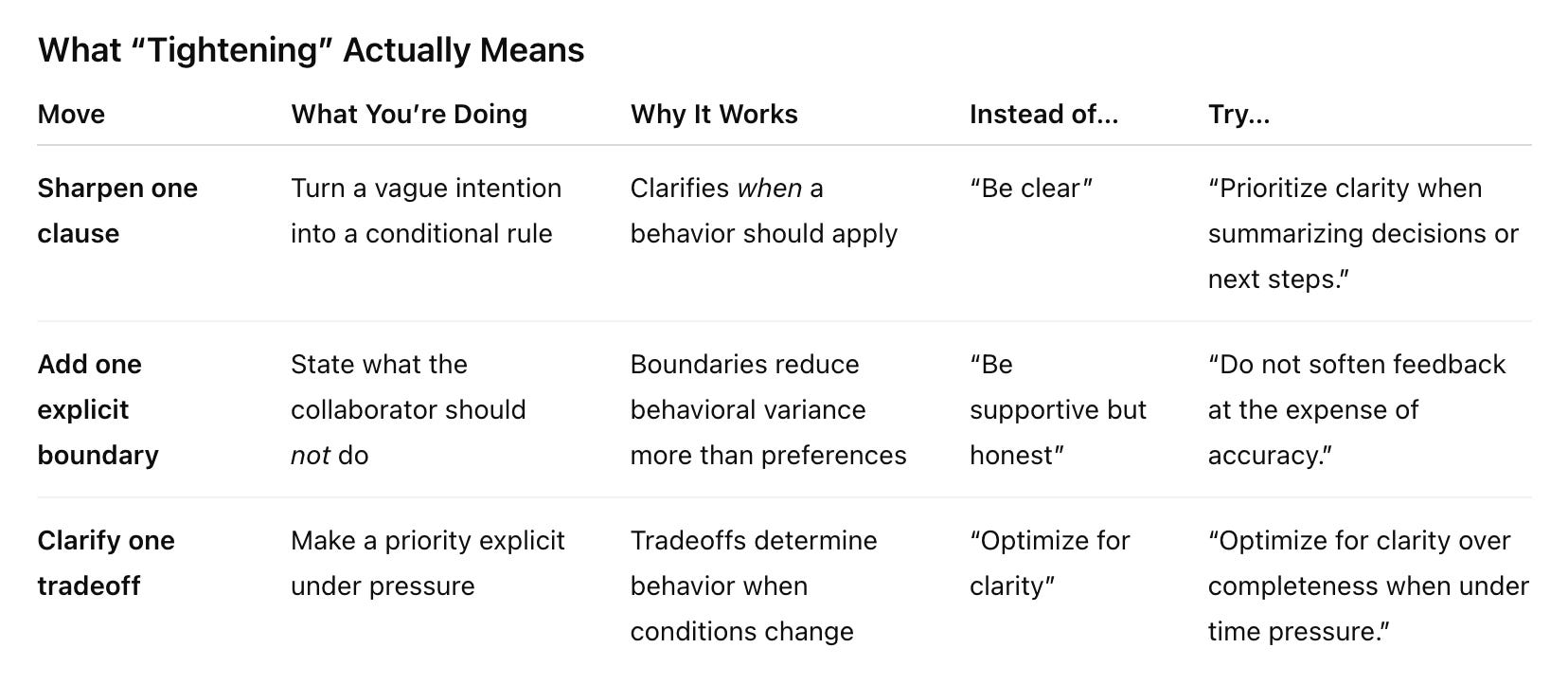
For example, instead of:
“Optimize for clarity”
Try:
“Optimize for clarity over completeness when under time pressure.”
Now the system knows what to sacrifice—and when.
Turn the Artifacts into Living Infrastructure
Once validated, the artifacts stop being backups and start becoming infrastructure.
You can:
reuse them across chats
version them as the work evolves
adapt them for adjacent collaborators (editor → reviewer → challenger)
At that point, the collaborator isn’t working because of momentum. It’s working because its behavior is intentionally held.
Once validated, the artifacts shouldn’t live only inside a chat. If reopening a conversation is the only way to recover how a collaboration worked, that collaboration is still fragile.
The Collaboration Contract should be easy to find. The Project Spine should reflect the current phase, not the original intent. Interaction Preferences should be easy to adjust as the work evolves.
A simple check that tells you whether the artifacts are doing their job:
Could I paste these into a new chat right now without explaining anything?
A Note on Agency (Why This Matters)
This pattern supports:
collaboration as a role
personality as behavior
continuity of work, not self
Philosophically speaking, an agent is something that:
acts with intention
makes its own choices
is the source of its own actions (not merely carrying out someone else’s will)
can be held responsible for what it does, morally or by social norms
An AI collaborator does not meet these criteria.
It can behave as if it were an agent—by holding a role, following constraints, and responding consistently—but it is not one.
That distinction is why this pattern focuses on behavioral specification, not memory, identity, or persistence.
You are not preserving agency. You are reconstructing a working stance.
Try It
When a collaboration is going well, ask the AI to generate three short artifacts.
Collaboration Contract
Summarize the collaborative stance you’ve been taking in this project. Write this as a reusable collaboration contract focused on behavior, not identity. Project Spine
Extract a concise project spine: the core goal, current phase, constraints, and what should not be re-opened.Interaction Preferences
Summarize my interaction preferences for this project: tone, pacing, depth, and how assertive or exploratory responses should be.When starting a new chat—or after quality slips—paste the three documents and say:
Rehire Instructions
This is a re-instantiation. There is no continuity from prior chats.
Use the following documents to re-establish the collaborative role and continue the work.

[Collaboration Contract] [Project Spine] [Interaction Preferences]
When This Pattern Is Useful
Use it when:
work spans weeks or months
quality matters more than speed
resets are disruptive
you want a collaborator, not a companion
If your work involves reuse, pushback, or maintenance, one-off prompting is no longer sufficient on its own.
Final Note
If a reset felt jarring, it was a signal that the collaboration had real structure and that structure deserved to be made explicit.
Agents start to matter when you want to reuse something, share it, or put guardrails around it. An agent doesn’t make behavior better. It makes a chosen behavior easier to reuse.
Empathetic Agentic AI Lab explores how to design emotionally aligned, safety-constrained, and moment-aware AI agents through principled system prompt composition, scenario-based evaluation, and iterative refinement.
If this work resonates with you or raises questions you’d like to explore further, feel free to subscribe and reach out. I read and respond to every message.
This is probably the best way to use it. I find it useful to have a pre-built prompt template for the most common "roles” I create, and a specific README so I can copy/paste super fast.
Judy, this is absolutely brilliant. Definitely something I'm going to be using to try and address the context rot that I get in a lot of my longer projects with AI tools.